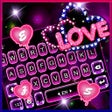
Neon Love Theme: Photo Keyboard for Neon and Romantic Styles
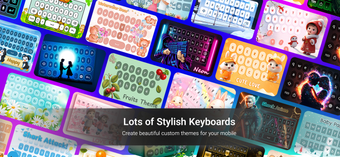
Neon Love Theme, developed by Aditya Sharma, is a Photo Keyboard utility that replaces the standard typing interface with visually driven themes on iPhone and iPad. The app installs a keyboard extension and supplies more than 1,000 neon and 3D themes, 100+ fonts, GIFs, stickers, auto-correct and voice typing, plus 50+ tap sounds. It supports over 50 languages and runs on devices with iOS 13.0 or later, appealing to social messaging users who want expressive, personalized keyboards.
The app converts the system keyboard into a heavily themed photo keyboard
Neon Love Theme installs as a keyboard extension and lets users apply high-definition neon and romantic visuals as the typing surface. The utility includes an integrated emoji, sticker, and GIF keyboard and a large font collection, with over 1,000 categorized themes and 100+ artistic fonts. Users can adjust key styles, colors, and choose from more than 50 tap sounds to alter the typing feedback.
It makes explicit privacy promises about typing data
The developer's privacy notes state the keyboard does not collect personal conversations, passwords, or specific characters typed, which addresses a primary concern for third-party keyboards. The app also supports more than 50 languages, so language pack coverage is broad. These statements provide a clear security signal, though standard keyboard-extension permissions still apply when enabling a custom keyboard on the device.
Setup and reliability suit visually oriented users but require patience
The app targets customization rather than minimal configuration, and user feedback sits at about 4.3 out of 5 from over 1,000 users. That rating includes praise for the theme variety and notes about occasional technical issues and setup difficulty during the initial configuration. The app runs on devices with iOS 13.0 or later and on Mac systems with M1 chips, so platform compatibility is broad; allow time to configure and test before making it your daily keyboard.
The app is a strong aesthetic choice for customization-first users
The app is a practical option for users who prioritize decorative keyboards and expressive messaging, provided they accept some setup friction and occasional stability reports. Users who want to avoid interruptions should test the keyboard in a few conversations before assigning it as the primary input. Recommended.